
Proxies and ProxyAuth
Proxy Setup
CAUTION
To determine real client IP addresses for rate limiting and logging, VoidAuth relies on standard X-Forwarded-* HTTP headers passed by your reverse proxy (e.g., Caddy, NGINX, Traefik). By default, TRUSTED_PROXIES is pre-configured to trust all private IP ranges, which works for most deployments. For additional security, you may restrict TRUSTED_PROXIES to the exact IP address or CIDR range of your upstream reverse proxy.. It is vital that you configure your reverse proxy to completely strip or overwrite incoming X-Forwarded-* headers from untrusted public clients before forwarding the request to VoidAuth. Never expose the application's listening port directly to the public internet, and when possible make your VoidAuth instance reachable only by your reverse proxy.
This section will show how to set up example proxies securely, and assumes you are intending to use ProxyAuth for some services. Even if you do not intend to use ProxyAuth, the guides below will show how to securely route to a VoidAuth instance.
VoidAuth exposes two proxy auth endpoints, which one you use will depend on your reverse-proxy.
| Endpoint | Reverse Proxy |
|---|---|
| /api/authz/forward-auth | Caddy, Traefik |
| /api/authz/auth-request | NGINX |
These endpoints are mostly the same, but limitations in NGINX make a separate endpoint necessary.
WARNING
You must set up your reverse-proxy AND VoidAuth correctly to protect a domain! This will involve modifying your reverse-proxy config to put the domain 'behind' VoidAuth, and then adding that domain to the VoidAuth ProxyAuth Domain list with an access group(s). Instructions below assume that the internal address of your VoidAuth instance, reachable by the reverse proxy, is http://voidauth:3000.
Caddy
Caddy handles X-Forwarded-* HTTP headers automatically. You can setup ProxyAuth using Caddy as a reverse-proxy with the following CaddyFile which protects domain app.example.com using VoidAuth hosted on auth.example.com
# Serve VoidAuth
auth.example.com {
  reverse_proxy voidauth:3000
}

# # or Serve VoidAuth on sub-directory of example.com
# example.com {
#   # DO NOT rewrite or strip the path
#   # use 'handle' instead of 'handle_path'
#   handle /auth/* {
#     reverse_proxy voidauth:3000
#   }
# }

# Serve your protected app
app.example.com {
  forward_auth voidauth:3000 {
    uri /api/authz/forward-auth
    copy_headers Remote-User Remote-Groups Remote-Name Remote-Email
  }

  reverse_proxy app:8080
}
NGINX Snippets
In order to use NGINX or NGINX Proxy Manager, you should make a snippets/ directory available to their configuration. In all examples, this will be mounted/available at /config/nginx/snippets/.
proxy.conf
proxy_set_header Host $host;
proxy_set_header X-Original-URL $scheme://$http_host$request_uri;
proxy_set_header X-Forwarded-Proto $scheme;
proxy_set_header X-Forwarded-Host $http_host;
proxy_set_header X-Forwarded-URI $request_uri;
proxy_set_header X-Forwarded-For $remote_addr;
websockets.conf
proxy_set_header Upgrade $http_upgrade;
proxy_set_header Connection "upgrade";
auth-location.conf
location /api/authz/auth-request {
  internal;

  include /config/nginx/snippets/proxy.conf;

  # extra settings, don't pass the entire body to auth_request
  proxy_set_header Content-Length "";
  proxy_set_header Connection "";
  proxy_pass_request_body off;

  # url to send auth_request
  proxy_pass http://voidauth:3000/api/authz/auth-request;
}
proxy-auth.conf
auth_request /api/authz/auth-request;

auth_request_set $user $upstream_http_remote_user;
auth_request_set $groups $upstream_http_remote_groups;
auth_request_set $name $upstream_http_remote_name;
auth_request_set $email $upstream_http_remote_email;

proxy_set_header Remote-User $user;
proxy_set_header Remote-Groups $groups;
proxy_set_header Remote-Name $name;
proxy_set_header Remote-Email $email;

# If response 401 or 407 code, try to redirect to Location Header as if 302.
# NGINX auth_request cannot handle codes except 2xx and 4xx, this is a workaround
auth_request_set $redirection_url $upstream_http_location;
error_page 401 =302 $redirection_url;
error_page 407 =302 $redirection_url;
NGINX
NGINX does not handle the security or setting of X-Forwarded-* headers automatically. In the example below this is handled by placing the proxy.conf snippet in the VoidAuth configuration block.
NGINX is configured with a nginx.conf file mounted at /etc/nginx/nginx.conf. In this example, we will also be mounting config snippets at /config/nginx/snippets/ that will be used in the configuration.
WARNING
While outside the scope of this guide, you MUST setup https:// termination for your browser-facing reverse-proxy with a certificate that the browser will trust or VoidAuth will NOT work properly. A bare NGINX reverse-proxy will NOT do this for you.
nginx.conf
events {
  worker_connections 1024;
}

http {

  # Serve VoidAuth
  server {
    listen 443 ssl http2;
    server_name auth.example.com;

    # SSL (https) config goes here...

    location / {
      include /config/nginx/snippets/proxy.conf;
      proxy_pass http://voidauth:3000;
    }
  }

  # # or Serve VoidAuth on a sub-directory of example.com
  # server {
  #   listen 443 ssl http2;
  #   server_name example.com;

  #   # Subdirectory hosting
  #   location /voidauth/ {
  #     include /config/nginx/snippets/proxy.conf;
  #     proxy_pass http://voidauth:3000;
  #   }
  # }

  # Serve your protected app
  server {
    listen 443 ssl http2;
    server_name app.example.com;

    # SSL (https) config goes here...

    # Snippet make VoidAuth available for auth_request
    include /config/nginx/snippets/auth-location.conf;

    location / {
      include /config/nginx/snippets/proxy.conf;
      # If your protected app uses websockets, un-comment the line below
      # include /config/nginx/snippets/websockets.conf;

      # Snippet to send auth_request to VoidAuth before accessing protected app
      include /config/nginx/snippets/proxy-auth.conf;
      proxy_pass http://app:8080;
    }
  }
}
NGINX Proxy Manager
As an NGINX based reverse-proxy, NGINX Proxy Manager also requires the same NGINX Snippets, which in all examples are assumed to be mounted at /config/nginx/snippets/. The following example will assume you are hosting VoidAuth and your protected app on their own sub-domains of example.com and must be adjusted if you are hosting either on sub-directories.
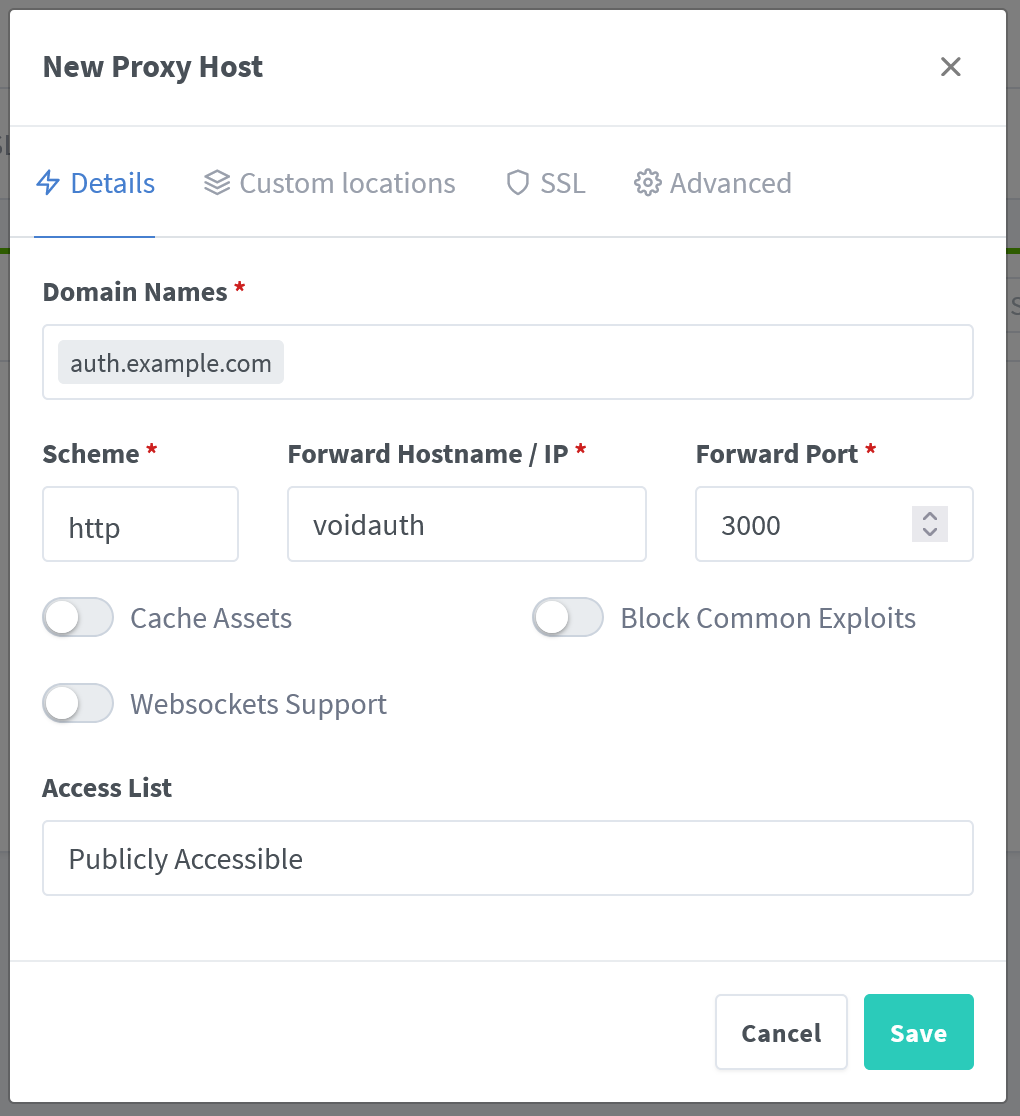
To Serve VoidAuth:
- Visit the
Proxy Hostspage andAdd a Proxy Host - Fill out the
Detailstab - Fill out the
SSLtab with your SSL configuration - Fill out the
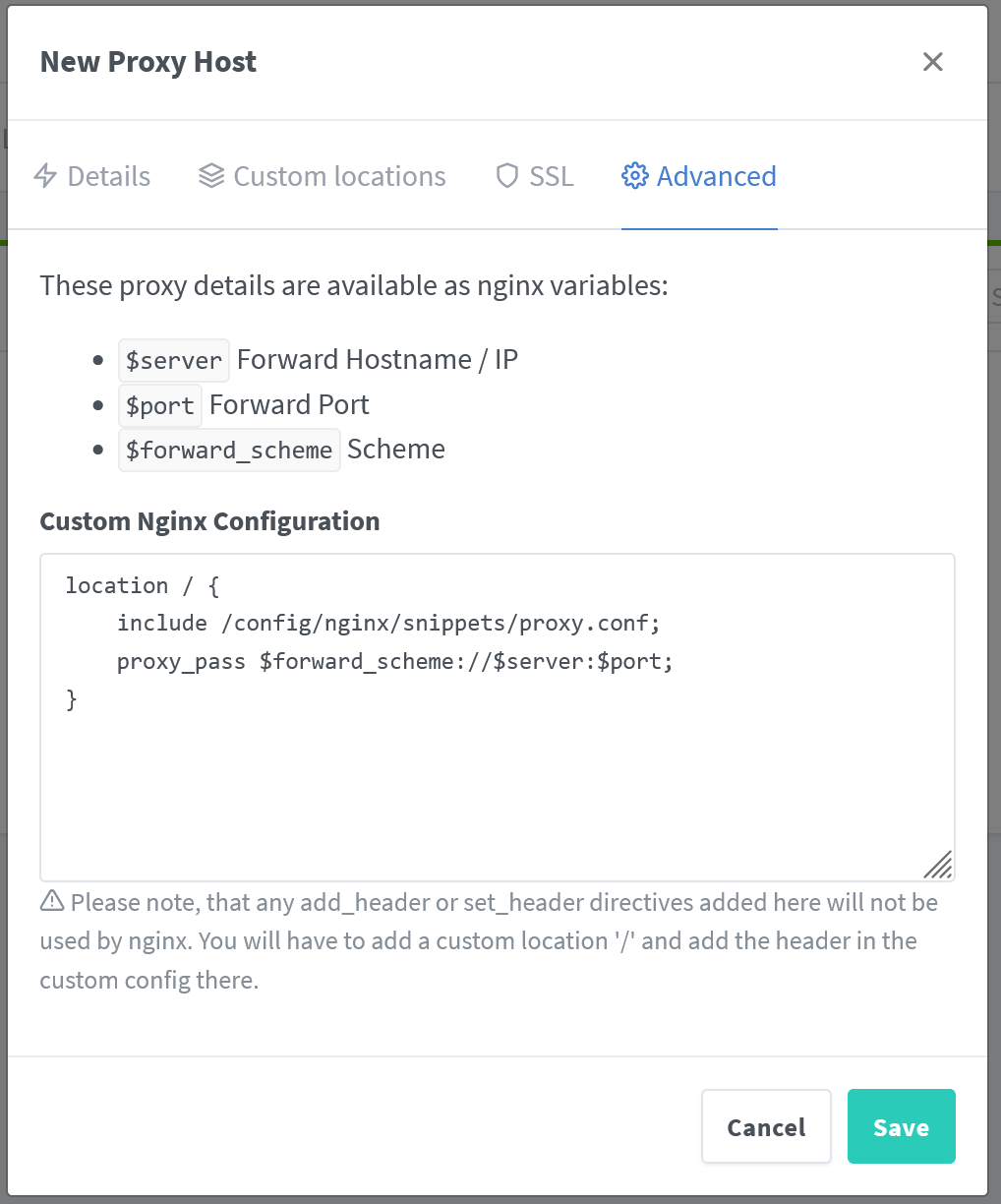
Advancedtab; this is done to allow including theproxy.confsnippet and will also be required for any protected apps we add laterconflocation / { include /config/nginx/snippets/proxy.conf; proxy_pass $forward_scheme://$server:$port; }
To Serve Your Protected App:
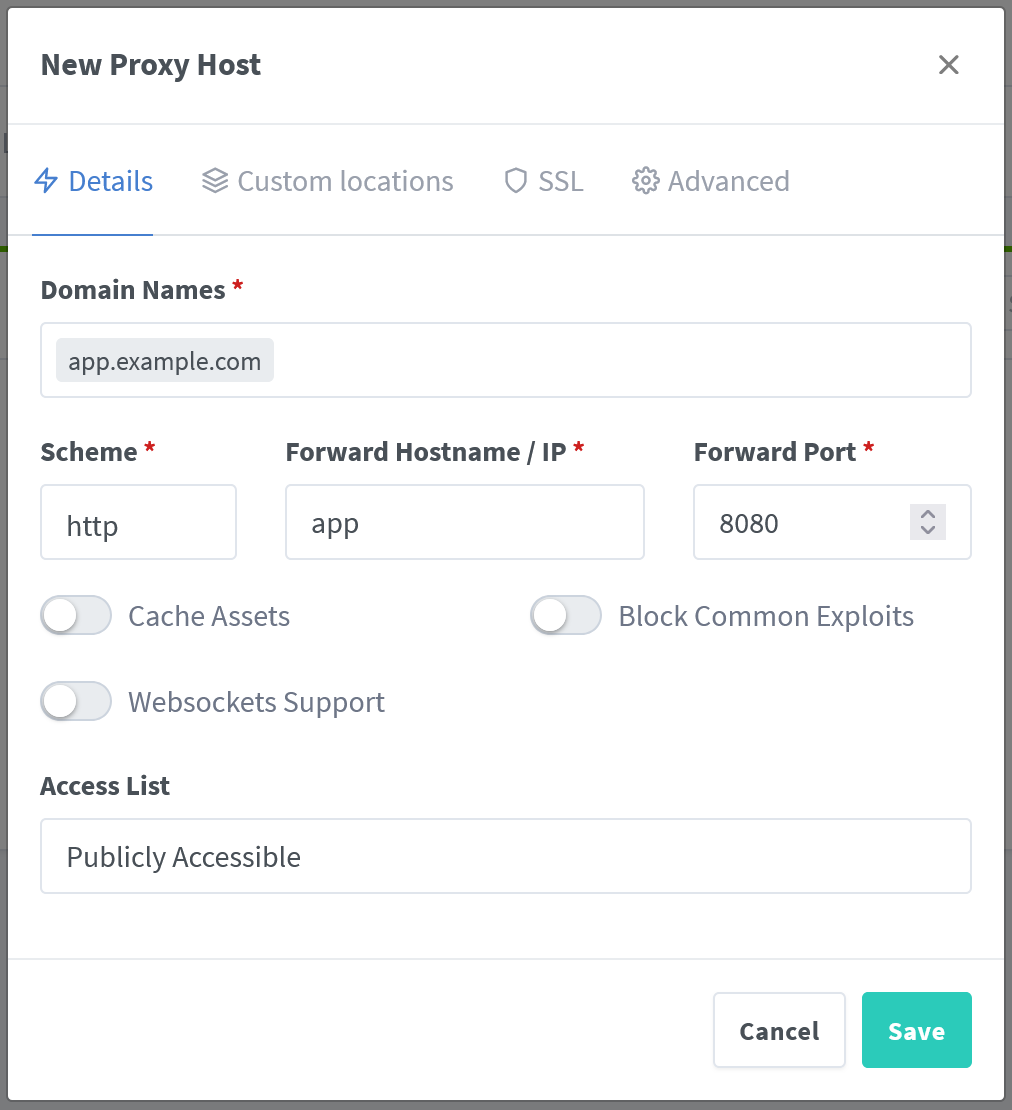
- Visit the
Proxy Hostspage andAdd a Proxy Host - Fill out the
Detailstab - Fill out the
SSLtab with your SSL configuration - Fill out the
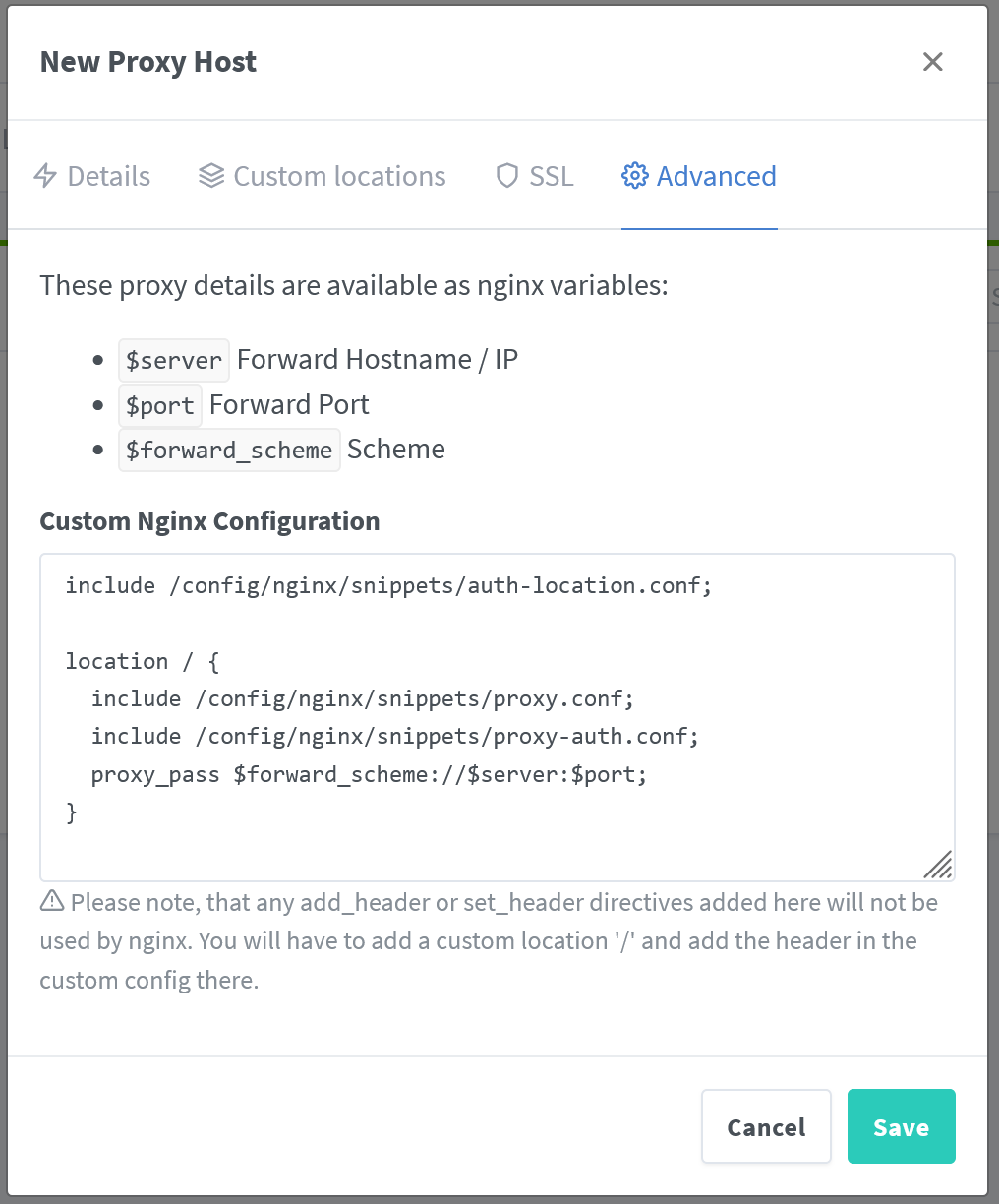
Advancedtab; this configuration will include snippets that instruct NGINX to use VoidAuth for ProxyAuthconfinclude /config/nginx/snippets/auth-location.conf; location / { include /config/nginx/snippets/proxy.conf; # If your protected app uses websockets, un-comment the line below # include /config/nginx/snippets/websockets.conf; include /config/nginx/snippets/proxy-auth.conf; proxy_pass $forward_scheme://$server:$port; }
WARNING
If your protected app requires websockets, make sure to un-comment the line in the Advanced tab that includes the websockets.conf snippet.
Traefik
Below is an example compose.yml file that configures VoidAuth as a ProxyAuth middleware using Traefik for a protected whoami application. This example does not include certificate and https:// setup, docs for which can be found at Traefik TLS Overview, but this is required.
volumes:
  traefik-config:
  db:

services:
  traefik:
    container_name: traefik
    image: traefik:v3.7
    command:
      # EntryPoints
      - "--entrypoints.web.address=:80"
      - "--entrypoints.web.http.redirections.entrypoint.to=websecure"
      - "--entrypoints.web.http.redirections.entrypoint.scheme=https"
      - "--entrypoints.web.http.redirections.entrypoint.permanent=true"
      - "--entrypoints.websecure.address=:443"
      - "--entrypoints.websecure.http.tls=true"

      # Providers
      - "--providers.docker=true"
      - "--providers.docker.exposedbydefault=false"
      - "--providers.docker.network=proxy"

      # API & Dashboard
      - '--api=true'
      - "--api.dashboard=true"
      - "--api.insecure=false"

      # Observability
      - '--log=true'
      - "--log.level=INFO"
      - "--accesslog=true"
      - "--metrics.prometheus=true"
      - '--global.sendAnonymousUsage=false'
    ports:
      - '80:80'
      - '443:443'
    volumes:
      - /var/run/docker.sock:/var/run/docker.sock
      - traefik-config:/config
    labels:
      traefik.enable: 'true'
      traefik.http.routers.api.rule: 'Host(`traefik.example.com`)'
      traefik.http.routers.api.entryPoints: 'websecure'
      traefik.http.routers.api.tls: 'true'
      traefik.http.routers.api.service: 'api@internal'
      traefik.http.routers.api.middlewares: 'voidauth@docker'
    depends_on:
      - voidauth

  voidauth:
    image: ghcr.io/mitchelljfranklin/mitch-auth:latest
    volumes:
      - ./voidauth/config:/app/config
    environment:
      # Required environment variables
      APP_URL: # required
      STORAGE_KEY: # required
      DB_PASSWORD: # required
      DB_HOST: voidauth-db
    labels:
      traefik.enable: 'true'
      traefik.http.services.voidauth.loadbalancer.server.port: 3000 # Must match the APP_PORT environment variable if set
      traefik.http.routers.voidauth.rule: 'Host(`auth.example.com`)' # Should match the domain part of APP_URL
      traefik.http.routers.voidauth.entryPoints: 'websecure'
      traefik.http.routers.voidauth.tls: 'true'
      # Must be the INTERNAL address Traefik can reach VoidAuth directly, should NOT be the APP_URL
      # Will include the path part of APP_URL if it exists
      traefik.http.middlewares.voidauth.forwardAuth.address: 'http://voidauth:3000/api/authz/forward-auth'
      traefik.http.middlewares.voidauth.forwardAuth.trustForwardHeader: 'true'
      traefik.http.middlewares.voidauth.forwardAuth.authResponseHeaders: 'Remote-User,Remote-Name,Remote-Email,Remote-Groups'
    depends_on:
      - voidauth-db

  voidauth-db:
    image: postgres:18
    environment:
      POSTGRES_PASSWORD: # required
    volumes:
      - db:/var/lib/postgresql/18/docker

  whoami:
    container_name: whoami
    image: traefik/whoami
    labels:
      traefik.enable: 'true'
      traefik.http.services.whoami-service.loadbalancer.server.port: 80
      traefik.http.routers.whoami.rule: 'Host(`whoami.example.com`)'
      traefik.http.routers.whoami.entryPoints: 'websecure'
      traefik.http.routers.whoami.tls: 'true'
      traefik.http.routers.whoami.middlewares: 'voidauth@docker'
NOTE
The traefik.http.middlewares.voidauth.forwardAuth.address label on the VoidAuth service must use the internal forward-auth endpoint reachable by Traefik. When VoidAuth is hosted under a base path (for example APP_URL=https://example.com/auth), include that path in the address: http://voidauth:3000/auth/api/authz/forward-auth.
ProxyAuth
ProxyAuth Domains are protected through a collaboration between your reverse-proxy and VoidAuth. When a user navigates to a protected domain, your reverse-proxy will check with VoidAuth to ensure the user is logged in and should have access.
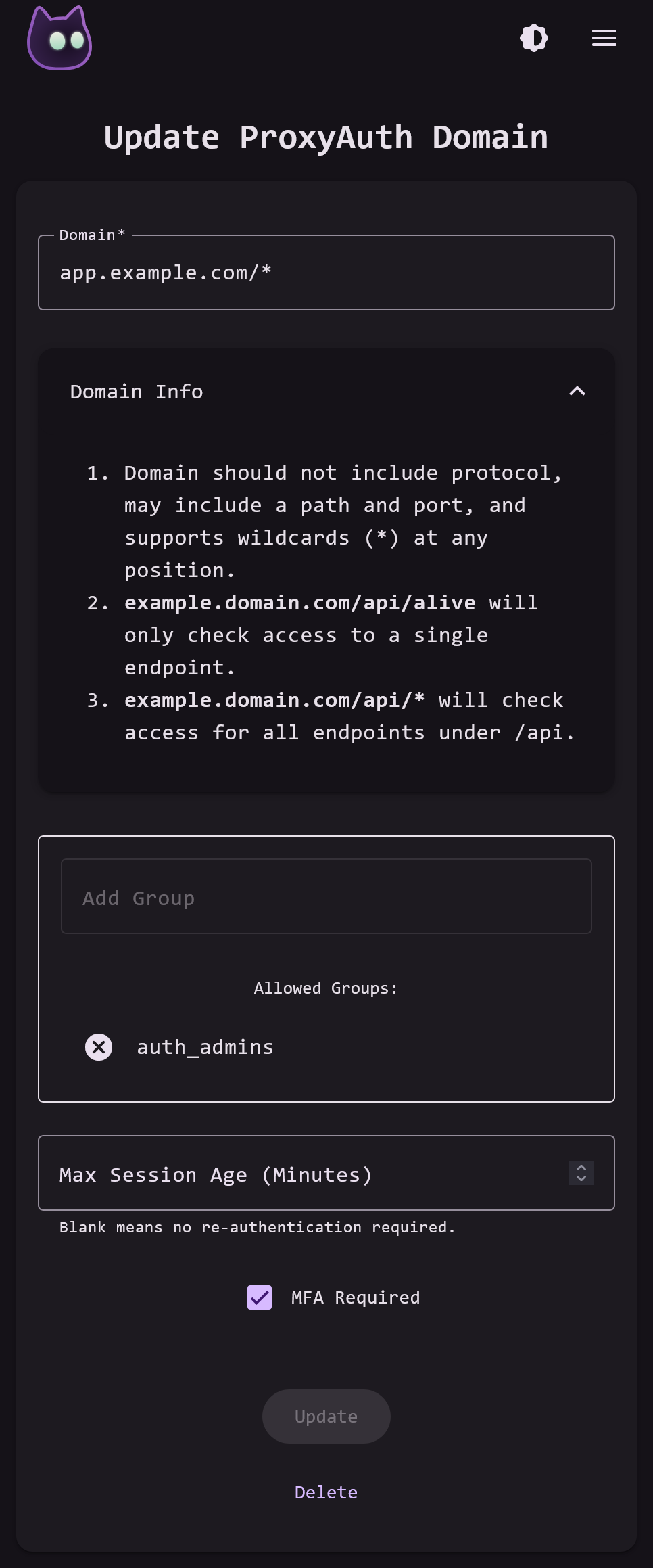
You can set up ProxyAuth secured domains on the VoidAuth Admin ProxyAuth Domains page.
Identifying Users
ProxyAuth can identify a user attempting a request to a protected domain using the three following methods, tried in order.
- Check for a valid user Session cookie in
x-voidauth-session. This is the common way that a user is identified when making the request through the browser. - Check for
Proxy-AuthorizationHeader using Basic Auth, and if so identify the user by username and password in the Header. If the Header is set but the user is not found respond with a 407 status code and the Proxy-Authenticate response Header set. - Check for
AuthorizationHeader using Basic Auth, and if so identify the user by username and password in the Header. If the Header is set but the user is not found respond with a 401 status code and the WWW-Authenticate response Header set.
Authorization
CAUTION
If no group is assigned to a ProxyAuth Domain, then any signed in user will have access to that domain.
When a user navigates to a protected domain their access will be checked against the first matching ProxyAuth Domain, from most specific to least specific. This is the same order that the ProxyAuth Domains are displayed by default on the Admin ProxyAuth Domain page. In the example below, a user with only the group [users] would not have access to app.example.com/admin/user_accounts but would have access to app.example.com/home. They would likewise not have access to secret.example.com, which would be matched by *.example.com/* and is only allowed to a user with the admin group.
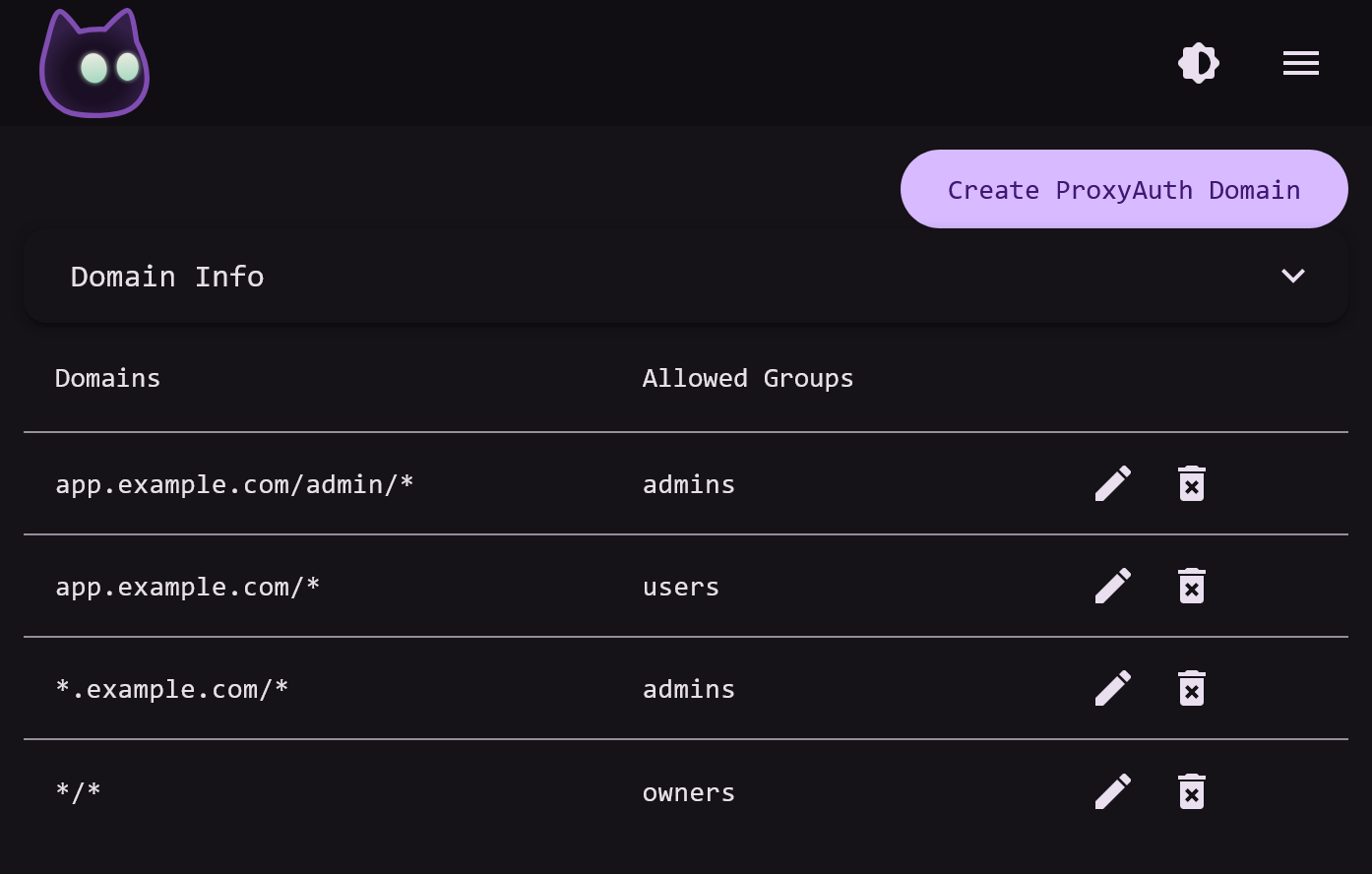
When creating ProxyAuth Domains, the trailing / and separators like . ARE CHECKED. Access to *.example.com does not give access to example.com, they must be added separately.
IMPORTANT
You can set up a wildcard ProxyAuth Domain */* which will cover any domain not matched by other entries in your ProxyAuth Domain settings.
Responses
When a user is identified and confirmed to have access to the requested resource, a 200 Success response is sent.
In all denied requests, a Location Header containing the location of the VoidAuth login or forbidden page is added to the response.
- When a user is not identified, either a
401,407, or302response code will be sent depending on the authorization endpoint and identification method used. - When a user is found but denied access, a redirect to the forbidden page which returns a
403Forbidden response code will be sent.
Trusted Header SSO
If a request is allowed, the following headers will be set on the response. This enables Trusted Header SSO on certain self-hosted applications:
Remote-User=usernameRemote-Email=emailRemote-Name=nameRemote-Groups=groupsin a comma separated list, ex.users,admins,owners