
Configuration
Admin Settings
Some settings can be managed from the Admin → Settings page in the web interface. Settings configured there override environment variable values where both exist. Changes take effect immediately after saving.
Users and Apps
User, OIDC App, and ProxyAuth Domain management is performed in the web interface. You can view the documentation on user management on the User Management page.
To start setting up protected applications, there are multiple authentication options available. If the application supports OIDC integration you can follow the instructions in the OIDC Setup guide. For alternate authentication methods, you should follow the ProxyAuth or LDAP Server guides.
Environment Variables
VoidAuth is configurable primarily by environment variable. For sensitive values, you may alternatively use FILE__* environment variables pointing to files. For example, FILE__STORAGE_KEY=/run/secrets/storage_key reads the STORAGE_KEY value from that file. Each FILE__* variable is mutually exclusive with its regular counterpart; you cannot have both FILE__STORAGE_KEY and STORAGE_KEY defined.
The available environment variables and their defaults are listed below:
App Settings
| Name | Default | Description | Required | Recommended |
|---|---|---|---|---|
| APP_URL | URL of the web interface. ex. https://auth.example.com or https://example.com/auth | 🔴 | ||
| TRUSTED_PROXIES | loopback, linklocal, uniquelocal | Sets trusted sources of sensitive HTTP headers. See documentation for how to securely set up a reverse proxy on the Proxies and ProxyAuth page. Accepts lists of IP addresses or CIDRs, special values loopback linklocal uniquelocal, true to trust all sources, or false to trust none. | ✅ | |
| STORAGE_KEY | Storage encryption key for secret values such as keys and OIDC App Client Secrets. Must be at least 32 characters long and should be randomly generated. If you do not enter one VoidAuth will recommend one to you. | 🔴 | ||
| STORAGE_KEY_SECONDARY | Secondary storage encryption key, used when rotating the primary storage encryption key. | |||
| SESSION_DOMAIN | ${APP_URL} Base Domain | Domain of the VoidAuth Session Cookie. This is automatically set to the Base Domain of ${APP_URL} but may be overridden here. Must be equal to or a higher level domain than ${APP_URL} | ||
| DEFAULT_REDIRECT | ${APP_URL} | The home/landing/app url for your domain. This is where users will be redirected upon accepting an invitation, logout, or clicking the header logo when already on the auth home page. | ✅ | |
| SIGNUP | false | Whether the app allows new users to self-register themselves without invitation. | ||
| SIGNUP_REQUIRES_APPROVAL | true | Whether new users who register themselves require approval by an admin. Setting this to false while SIGNUP is true enables open self-registration; use with caution! âš ï¸ | ||
| EMAIL_VERIFICATION | true if SMTP_HOST is set, otherwise false | If true, users must have an email address and will get a verification email when changing their email address before it can be used. If you are using an email provider, this should probably be true. | ||
| MFA_REQUIRED | false | If true, users must use a second security factor while logging in such as an Authenticator Token or Passkey | ||
| API_RATELIMIT | 60 | Rate Limit for mutating (state-changing) requests per minute per IP address. Default is 60, one per second. | ||
| ENABLE_DEBUG | false | Enables debug logging. âš ï¸WARNING!âš ï¸ This will cause the activity of users to be printed in the logs. |
App Customization
| Name | Default | Description | Required | Recommended |
|---|---|---|---|---|
| APP_TITLE | VoidAuth | Title that will show on the web interface, use your own brand/app/title. | ✅ | |
| APP_PORT | 3000 | The port that app will listen on. Can also be set to a unix-socket, ex. /tmp/sock | ||
| APP_COLOR | #906bc7 | Theme color, rgb format; ex. #xxyyzz | ✅ | |
| APP_FONT | monospace | Font used in the web interface and sent emails. Safe fonts should be used, if a font is missing it will fallback to default. Multiple font families may be chosen in fallback-font format. ex. APP_FONT: "Tahoma, Verdana, sans-serif" | ||
| CONTACT_EMAIL | The email address used for 'Contact' links, which are shown on most end-user pages if this is set. |
Database Settings
When using the sqlite database adapter type, no additional database connection variables are required. You will need a mounted volume to hold the generated db.sqlite file, as shown in the SQLite docker compose example above.
| Name | Default | Description | Required | Recommended |
|---|---|---|---|---|
| DB_ADAPTER | postgres | Allowed values are postgres and sqlite. | ||
| DB_HOST | Host address of the database. May also be a postgres Unix Domain Socket, see node-postgres Unix Domain Socket documentation here. | 🔴 (unless using SQLite database) | ||
| DB_PASSWORD | Password of the database. Not used if using SQLite database. | ✅ | ||
| DB_PORT | 5432 | Port of the database. Not used if using SQLite database. | ||
| DB_USER | postgres | Username used to sign into the database by the app. Not used if using SQLite database. | ||
| DB_NAME | postgres | Database name used to connect to the database by the app. Not used if using SQLite database. | ||
| DB_SSL | false | Enables SSL connection to the database. | ||
| DB_SSL_VERIFICATION | true | If DB_SSL is enabled, whether to verify the SSL certificate. |
Database Migration Settings
Use the following environment variables to configure a database migration. These variables exactly mirror the DB_* environment variables and describe the connection to be made to the new database. See details on how to migrate an existing database to a new one on the Database Migration page.
| Name | Default | Description | Required | Recommended |
|---|---|---|---|---|
| MIGRATE_TO_DB_ADAPTER | postgres | Allowed values are postgres and sqlite. | ||
| MIGRATE_TO_DB_HOST | Host address of the database. | |||
| MIGRATE_TO_DB_PASSWORD | Password of the database. Not used if migrating to SQLite database. | ✅ | ||
| MIGRATE_TO_DB_PORT | 5432 | Port of the database. Not used if migrating to SQLite database. | ||
| MIGRATE_TO_DB_USER | postgres | Username used to sign into the database by the app. Not used if migrating to SQLite database. | ||
| MIGRATE_TO_DB_NAME | postgres | Database name used to connect to the database by the app. Not used if migrating to SQLite database. | ||
| MIGRATE_TO_DB_SSL | false | Enables SSL connection to the database. | ||
| MIGRATE_TO_DB_SSL_VERIFICATION | true | If MIGRATE_TO_DB_SSL is enabled, whether to verify the SSL certificate. |
SMTP Settings
All of these settings are ✅ recommended to be set to the correct values for your email provider.
| Name | Default | Description |
|---|---|---|
| SMTP_HOST | SMTP Host; ex. mail.example.com | |
| SMTP_FROM | SMTP From address, should be a plain email address (ex. app@example.com). The SMTP From name will be populated with the APP_TITLE value. | |
| SMTP_PORT | 587 | SMTP port to use. |
| SMTP_SECURE | false | SMTP has TLS/SSL enabled. |
| SMTP_USER | SMTP username used to sign into email provider; ex user@example.com | |
| SMTP_PASS | SMTP password used to sign into email provider | |
| SMTP_NOAUTH | false | Disable SMTP authentication. Useful for SMTP servers that do not require authentication, such as servers using IP whitelisting. When set to true, SMTP_USER and SMTP_PASS are not required. |
| SMTP_IGNORE_CERT | false | SMTP Connection will ignore invalid and self-signed certificates from SMTP providers |
| SMTP_TLS_CIPHERS | TLS cipher to use, only set if required by your SMTP provider | |
| SMTP_TLS_MIN_VERSION | Minimum TLS version, only set if required by your SMTP provider. Possible values are TLSv1.3, TLSv1.2, TLSv1.1, TLSv1 |
LDAP Settings
LDAP is disabled by default. See the LDAP Server guide for setup details and client examples.
WARNING
LDAP Server functionality is experimental.
| Name | Default | Description | Required | Recommended |
|---|---|---|---|---|
| LDAP_ENABLED | false | Enables the read-only LDAP server. | ||
| LDAP_PORT | 3890 | Port the LDAP server listens on. | ||
| LDAP_BASE_DN | dc=voidauth | Base distinguished name for LDAP directory entries. | ||
| LDAP_BIND_DN | cn=ldap_bind,dc=voidauth | Service account DN LDAP clients can bind as before searching. | ||
| LDAP_BIND_PASSWORD | Password for the LDAP service account bind DN. | 🔴 if LDAP_ENABLED is set. | ||
| LDAP_TLS_CERT_FILE | Path to a PEM certificate file. If set, LDAP_TLS_KEY_FILE must also be set and VoidAuth listens with LDAPS. | |||
| LDAP_TLS_KEY_FILE | Path to the PEM private key file for LDAP_TLS_CERT_FILE. |
Misc.
| Name | Default | Description | Required | Recommended |
|---|---|---|---|---|
| PASSWORD_STRENGTH | 3 | The minimum strength of users passwords, at least 3 is recommended. Must be between 0 - 4 inclusive. | ||
| ADMIN_EMAILS | hourly | The minimum duration between admin notification emails. Can be set to values like: '4 hours', '30 minutes', 'weekly', 'daily', etc. or a number in seconds. If set to 'false', admin notification emails are disabled. | ||
| DEFAULT_USER_EXPIRES_IN | The default duration before a new users access will expire as shown on the Invitation page. Can be set to values like: '4 hours', '30 minutes', '1 week', '2 days', etc. or a number in seconds. |
IMPORTANT
Some configuration options only work when used together. EMAIL_VERIFICATION should only be set if the SMTP_ options are also set. Likewise, SIGNUP_REQUIRES_APPROVAL does nothing unless SIGNUP is set.
Config Directory
Your own branding can be applied to the app by mounting the /app/config directory and adding files or modifying the existing files.
The logo images of the web interface can be customized by placing your own images in the mounted /app/config/branding directory. The files you can add are listed below:
| Name | Extension |
|---|---|
| logo | svg, png |
| favicon | svg, png |
| apple-touch-icon | png |
WARNING
If any custom branding images are found in the mounted /app/config/branding directory, the default VoidAuth images will not be available. You may want to make sure that custom logo, favicon, and apple-touch-icon are all added together.
For information on how to change the email templates used for invitations, password resets, email verification, etc. see the documentation page for Email Templates.
You may also add/modify the custom.css file located in the /app/config/branding directory to add your own styling to the web interface.
Customization
IMPORTANT
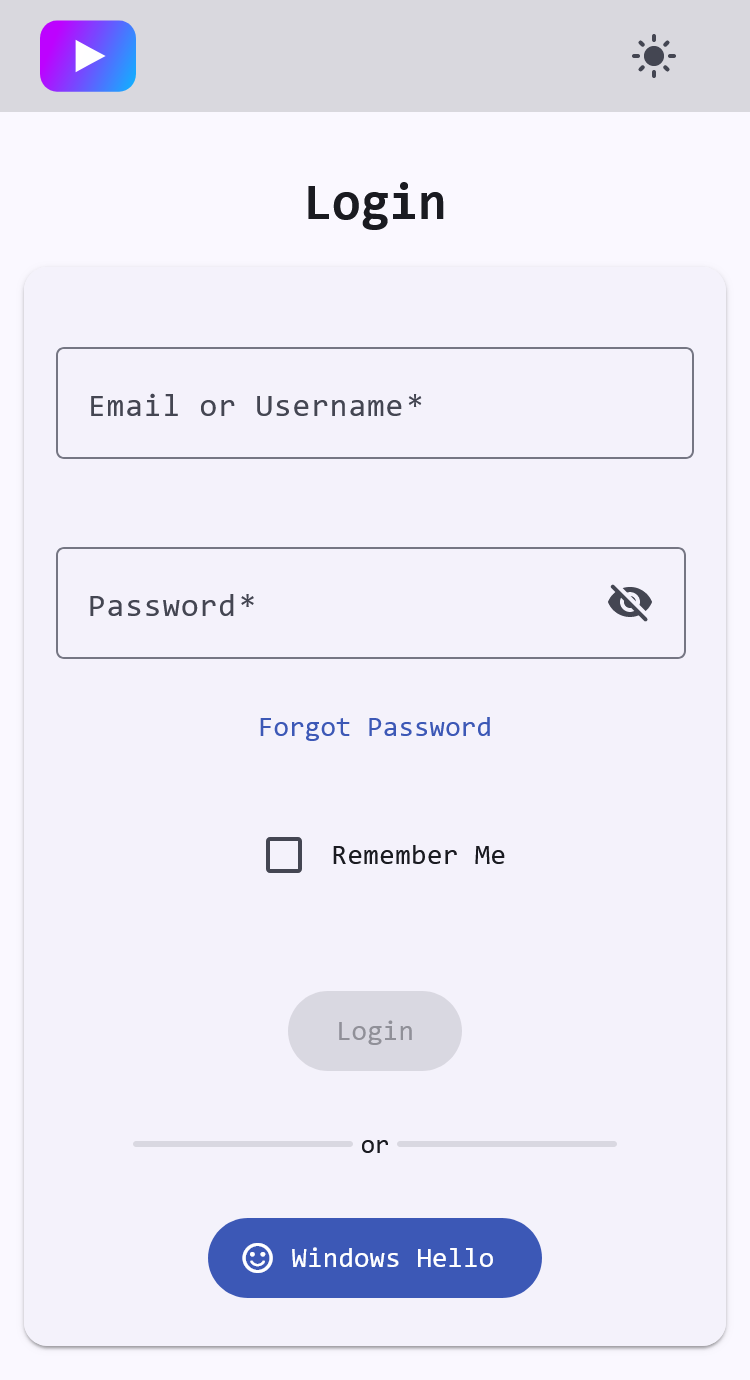
There are enough branding options between environment variables like APP_TITLE, APP_COLOR, and config directory customization to remove any end-user reference to VoidAuth branding. You can make it your own! Below is an example of some theming changes and light mode enabled:
Experimental
WARNING
The following configurations are not well supported or tested, but may cover additional use-cases.
Multi-Domain Protection
You can secure multiple domains you own while maintaining a single set of user accounts by running multiple instances of VoidAuth using the same database. They should have the same STORAGE_KEY and DB_* variables, but may otherwise have completely different configurations. The APP_URL variables of each would cover a different domain. If the domains you were trying to secure were example.com and your-domain.net you might set the APP_URL variables like https://auth.example.com and https://id.your-domain.net. These two instances would share everything in the shared DB, including users, OIDC Apps, ProxyAuth Domains, etc.